Email How-To Tip |
By Robert Graf-Waczenski
Senior Applications Programmer, L-Soft
Subscription consent and tracking consent serve different purposes. One helps subscribers decide whether they want to receive a particular type of content. The other allows them to decide how their engagement data is handled. Understanding this distinction can help you build trust, respect subscriber preferences and manage consent more effectively across your communication programs. LISTSERV Maestro makes it easy to implement and manage both types of consent.
In a previous tech tip, we explained how to use the special "Subscription Consent" profile field for your email list and how to re-engage subscribers who had already joined before the field was added.
When someone subscribes to your list, agreeing to the subscription terms creates a shared understanding between the subscriber and the list owner. The subscriber agrees to receive the type of content described, and the list owner agrees to use the list in accordance with those terms.
In LISTSERV Maestro, the "Subscription Consent" field helps communicate those terms during signup. By clearly explaining what content subscribers can expect to receive, you help them make informed decisions and build trust through greater transparency.
While "Subscription Consent" determines whether someone can subscribe to a specific list, "Consent to Personal Tracking" determines whether the subscriber's engagement with your messages is tracked with personal details or anonymously. One consent is about receiving content, while the other is about privacy preferences.
Key Distinction:
Throughout this how-to series, we use the fictional Goode University example. To give subscribers a choice about how their engagement data is handled, you can add the special "Consent to Personal Tracking" field at the list group level. Before adding this field, a typical list group might contain the following shared profile fields:
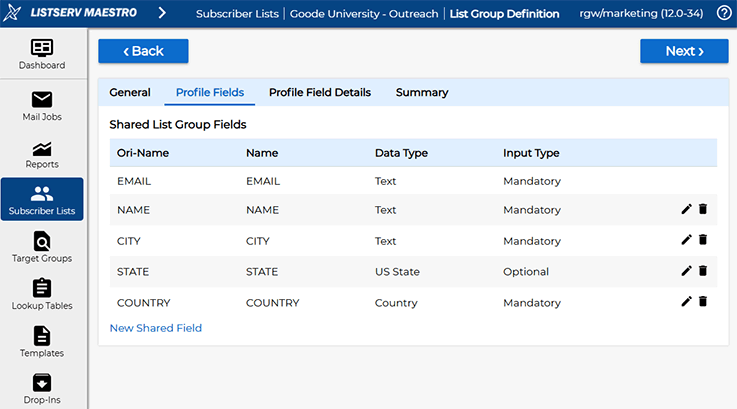
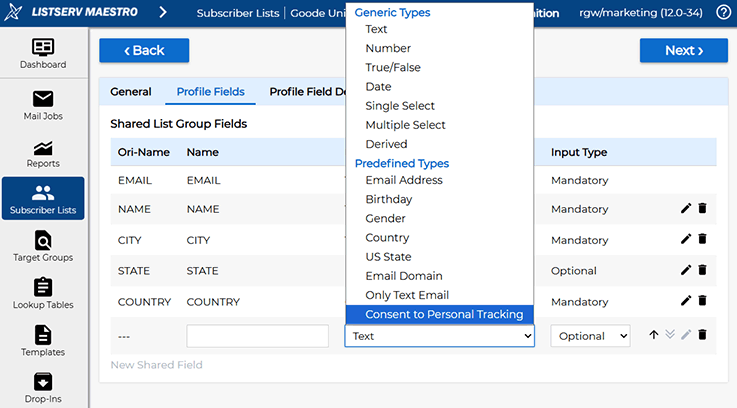
To add the new field, click the "New Shared Field" link and select "Consent to Personal Tracking" under the "Predefined Types" section:
After adding the field, this is what you will see:
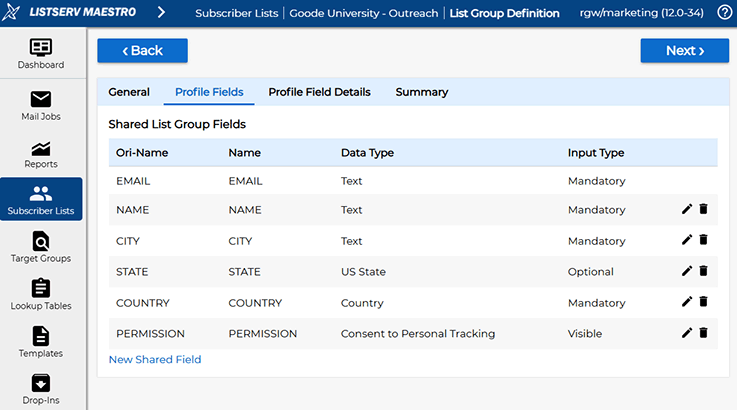
Under the hood, the field is a Boolean field with true and false values. To better visualize the semantics to subscribers, it's recommended that you choose "Drop-Down Menu" as the input control:
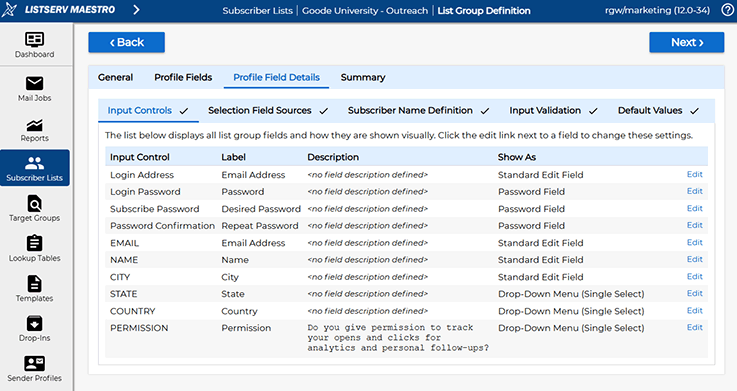
This allows you to explicitly specify what "Yes" and "No" or "True" and "False" means:
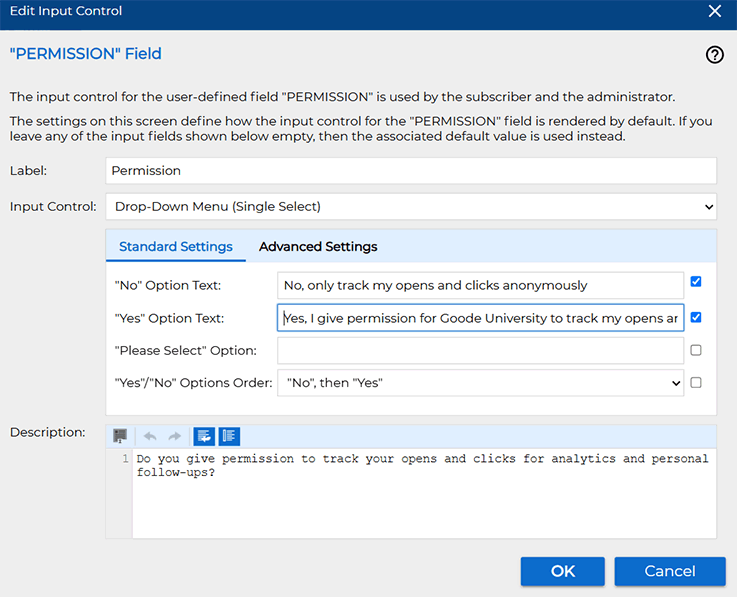
With these settings in place, the subscription screen for a list looks like this:
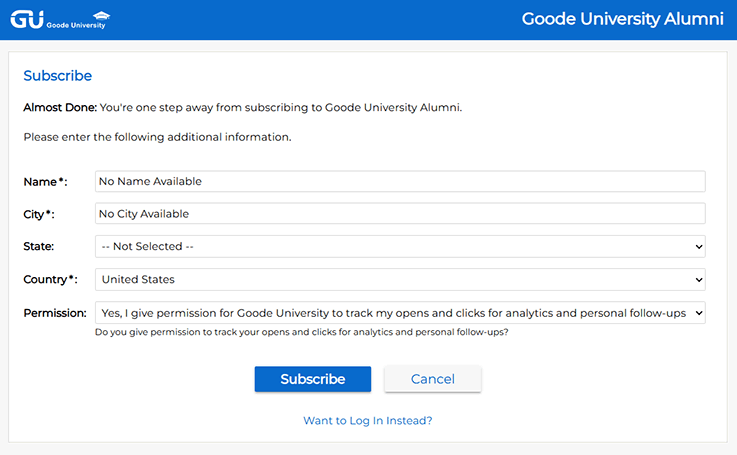
Note that even if a subscriber selects "No" for personal tracking, messages sent to that subscriber will still contain a tracking pixel that records opens. The difference is that the resulting data is anonymized and cannot be associated with the subscriber's individual profile. The subscriber is also excluded from personal follow-up actions based on engagement data.
The same principle applies to tracked link clicks. When a subscriber selects "No", click activity is recorded in an anonymized form. When a subscriber selects "Yes", click and open activity can be associated with the subscriber's profile in the list group, enabling personal tracking and follow-up communication.
To see why these two consent types are managed differently, let's continue with our fictional Goode University example.
Goode University uses a list group as a central hub for external communications, storing subscriber profiles and shared preferences. Within that list group are several email lists, each serving a different purpose, such as training courses, newsletters and alumni communications.
Goode University also maintains separate list groups for internal and administrative communications. In those cases, additional subscription or tracking consent fields may not be necessary because communication rights and responsibilities are already governed by employment or other institutional agreements.
The outbound list group serves as the central hub for subscriber profiles, contact information and shared preferences.
Within the same list group, Goode University operates several subscriber lists, each with a different purpose, audience and set of expectations. Because the content and responsibilities associated with each list vary, subscribers may need to agree to different terms depending on the list they choose to join.
Content: Advanced cybersecurity modules, vulnerability assessment and technical exploits
Subscription Terms: Requires a legal disclaimer and code of conduct acknowledging that course materials will used be only for authorized, defensive security testing
Content: Business strategy, HR frameworks and corporate governance
Subscription Terms: Requires an agreement to professional terms of service and confidentiality requirements
Content: Job postings, recruitment opportunities and networking events
Subscription Terms: Requires an agreement to privacy guidelines and community participation rules
How it Works: List owners can add a special "Consent to Subscription Terms" field to any subscriber list. When enabled, prospective subscribers must confirm that they have read and agree to the list's subscription terms before joining the list. This confirmation is typically presented as a checkbox during the signup process. This helps ensure that expectations are clear for both subscribers and list owners from the start.
This separation reflects how organizations manage consent and how subscribers think about privacy preferences:
This approach helps organizations communicate clearly, respect subscriber preferences and manage consent in a way that is both practical and transparent.
Consider how your organization manages subscription and tracking preferences today. Are subscribers given clear information about the content they will receive and the choices they have regarding personal tracking?
LISTSERV Maestro helps organizations manage both in ways that are transparent for subscribers and practical for communication teams. Subscribers who consent to personal tracking can receive more relevant and timely follow-up communications, while those who do not can still be included in anonymized reporting. This helps organizations balance privacy, transparency and communication insights while respecting individual preferences.
Do you have questions about configuring consent preferences or personal tracking? L-Soft Technical Support can help. Interested in bringing these capabilities to your organization? Contact L-Soft Sales to learn more about LISTSERV Maestro.
Was this article helpful to you? Would you recommend it to a colleague? Your input helps us create content that truly supports your work. Thank you!


 Want More Insights? Catch up with the latest LISTSERV developments, industry best practices, expert tips, tutorials and more. |
LISTSERV is a registered trademark licensed to L-Soft international, Inc.
See Guidelines for Proper Usage of the LISTSERV Trademark for more details.
All other trademarks, both marked and unmarked, are the property of their respective owners.